| ❌ | ✅ | ✅ | ✅ | ✅ | ✅ |
|---|
Generic UART Device
Powered Up and EV3 support connecting generic UART devices to the hub. The pinout is shown below. Note the orientation of the connector. For EV3, the internal wire colors match those on the diagram below.
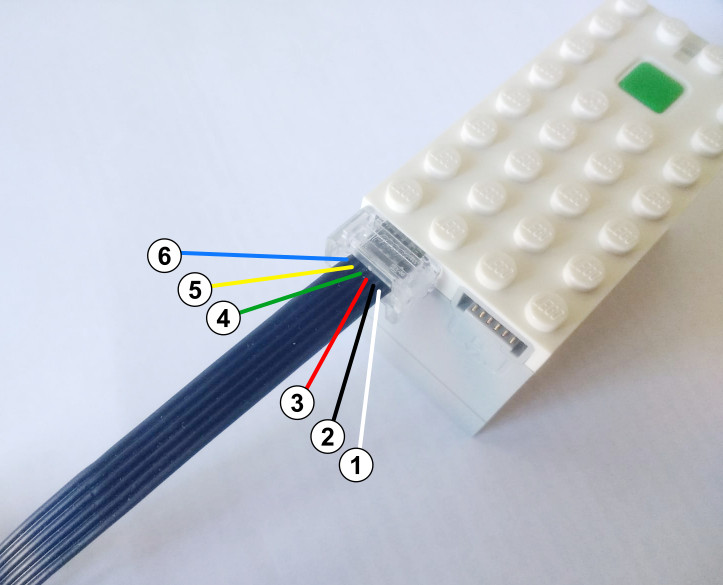
Pin |
Powered Up (UART) |
EV3 (UART sensor) |
EV3 (I2C sensor) |
|---|---|---|---|
1 (white) |
Motor Terminal 1 |
Optional battery power |
Optional battery power |
2 (black) |
Motor Terminal 2 |
N/A |
N/A |
3 (red) |
Ground |
Ground |
Ground |
4 (green) |
VCC (3.3 V) |
VCC (5 V) |
VCC (5 V) |
5 (yellow) |
Hub TX (Sensor RX) (3.3 V) |
Hub TX (Sensor RX) (3.3 V) |
SCL (master) (3.3 V) |
6 (blue) |
Hub RX (Sensor TX) (3.3 V) |
Hub RX (Sensor TX) (3.3 V) |
SDA (master) (3.3 V) |
- class UARTDevice(port, baudrate=115200, timeout=None, power_pin=0)
Generic UART device.
Note: Use the
power_pinoption at your own risk. Applying power to the pins can damage your hub or device if you are not careful. When you use this option, you will be prompted to confirm that you understand the risks.- Parameters:
port (Port) – Port to which the device is connected. On Powered UP hubs, all ports are supported. On EV3, only the sensor ports are supported.
baudrate (int) – Baudrate of the UART device.
timeout (Number, ms) – How long to wait during
readandwritebefore giving up. If you chooseNone, it will wait forever.power_pin (int) – Power requirements for the device. Use
0(default) for no power on the pins. On Powered UP hubs, use1or2for pin 1 or 2, respectively. This will apply battery power to the pin, equivalent to powering a motor. On EV3, use1to apply battery power to pin 1, though only minimal current is available.
- Raises:
ValueError – If
timeoutis 0 or negative.
- awaitread(length=1) bytes
Reads a given number of bytes from the buffer.
Your program will wait until the requested number of bytes are received. If this takes longer than
timeout, theETIMEDOUTexception is raised.- Parameters:
length (int) – How many bytes to read. Must be at least 1.
- Returns:
Bytes returned from the device.
- Raises:
ValueError – If
lengthis less than 1.OSError – If the read takes longer than
timeout.
- read_all() bytes
Reads all bytes currently in the buffer. Returns immediately without waiting, even if the buffer is empty.
- Returns:
Bytes currently in the buffer, or an empty bytes object if there is nothing to read.
- waiting() int
Gets how many bytes are still waiting to be read.
- Returns:
Number of bytes in the buffer.
- set_baudrate(baudrate)
Changes the baud rate of the UART device.
- Parameters:
baudrate (int) – Not all values may be supported.
- Raises:
ValueError – If
baudrateis less than 1.
- awaitwait_until(pattern)
Waits until a specific byte sequence is received. Bytes that do not match the pattern are discarded.
- Parameters:
pattern (bytes) – Byte sequence to wait for. Must not be empty.
- Raises:
ValueError – If
patternis empty.OSError – If this method is already in progress.
- clear()
Empties the receive buffer.
Example: Read and write to a UART device
#!/usr/bin/env pybricks-micropython
from pybricks.hubs import EV3Brick
from pybricks.iodevices import UARTDevice
from pybricks.parameters import Port
from pybricks.media.ev3dev import SoundFile

# Initialize the EV3
ev3 = EV3Brick()

# Initialize sensor port 2 as a uart device
ser = UARTDevice(Port.S2, baudrate=115200)

# Write some data
ser.write(b"\r\nHello, world!\r\n")

# Play a sound while we wait for some data
for i in range(3):
    ev3.speaker.play_file(SoundFile.HELLO)
    ev3.speaker.play_file(SoundFile.GOOD)
    ev3.speaker.play_file(SoundFile.MORNING)
    print("Bytes waiting to be read:", ser.waiting())

# Read all data received while the sound was playing
data = ser.read_all()
print(data)