| ✅ | ❌ | ❌ | ❌ | ❌ | ❌ |
|---|
Move Hub
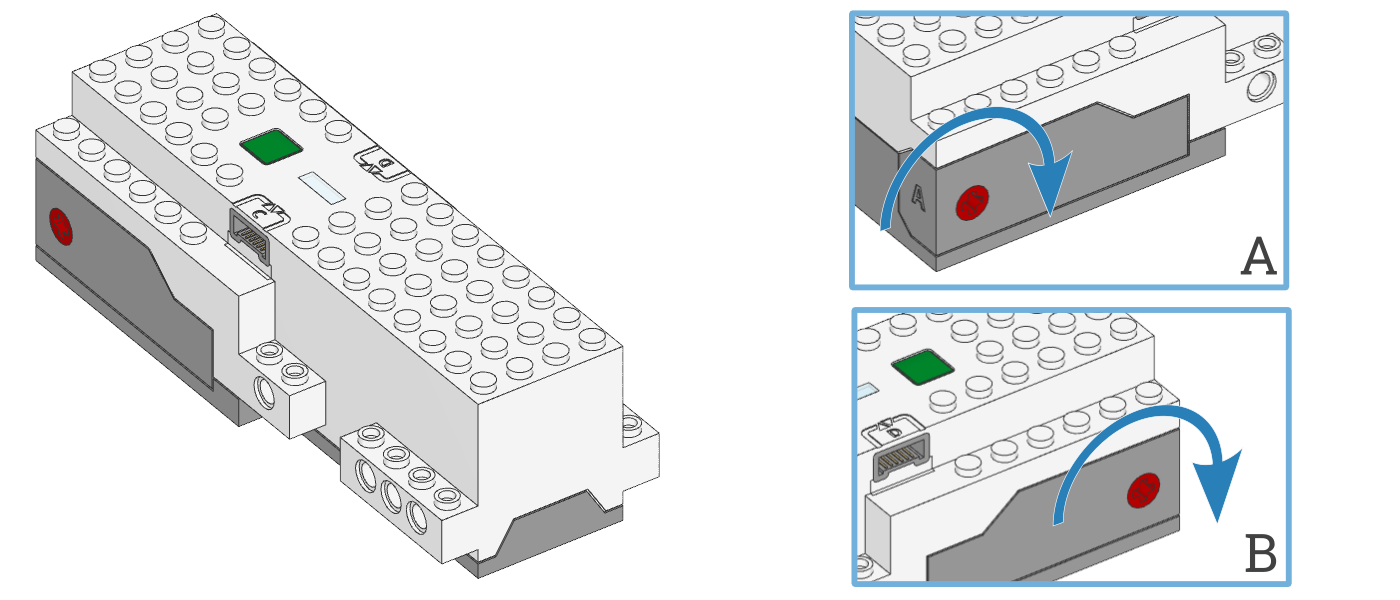
- class MoveHub(top_side=Axis.Z, front_side=Axis.X)
LEGO® BOOST Move Hub.
- Parameters:
Using the hub status light
- light.on(color)
Turns on the light at the specified color.
- Parameters:
color (Color) – Color of the light.
- light.off()
Turns off the light.
- light.blink(color, durations)
Blinks the light at a given color by turning it on and off for given durations.
The light keeps blinking indefinitely while the rest of your program keeps running.
This method provides a simple way to make basic but useful patterns. For more generic and multi-color patterns, use
animate()instead.
- light.animate(colors, interval)
Animates the light with a sequence of colors, shown one by one for the given interval.
The animation runs in the background while the rest of your program keeps running. When the animation completes, it repeats.
Using the IMU
- imu.up() Side
Checks which side of the hub currently faces upward.
- Returns:
Side.TOP,Side.BOTTOM,Side.LEFT,Side.RIGHT,Side.FRONTorSide.BACK.
- imu.tilt() Tuple[int, int]
Gets the pitch and roll angles. This is relative to the user-specified neutral orientation.
The order of rotation is pitch-then-roll. This is equivalent to a positive rotation along the robot y-axis and then a positive rotation along the x-axis.
- Returns:
Tuple of pitch and roll angles in degrees.
- imu.acceleration() Tuple[int, int, int]: mm/s²
Gets the acceleration of the device.
- Returns:
Acceleration along all three axes.
Changed in version 3.2: Changed acceleration units from m/s² to mm/s².
Using the battery
- battery.voltage() int: mV
Gets the voltage of the battery.
- Returns:
Battery voltage.
- battery.current() int: mA
Gets the current supplied by the battery.
- Returns:
Battery current.
Button and system control
- buttons.pressed() Set[Button]
Checks which buttons are currently pressed.
- Returns:
Set of pressed buttons.
- system.info() dict
Gets information about the hub as a dictionary with the following keys:
"name": The hub name. This is the name you see when connecting via Bluetooth."reset_reason": Why the hub (re)booted. It is0if the hub was previously powered off normally. It is1if the hub rebooted automatically, like after a firmware update. It is2if the hub previously crashed due to a watchdog timeout, which indicates a firmware issue."host_connected_ble":Trueif the hub is connected to a computer, tablet, or phone via Bluetooth, andFalseotherwise."host_connected_usb":Trueif the hub is connected to a computer via USB and activated in the app.Falseotherwise."program_start_type": It is1if the program started automatically when the hub was powered on. It is2if the program was started with the hub buttons. It is3if the program was started from your connected computer.“program_id”: Program (slot) number of the currently running program.
- Returns:
A dictionary with system info.
Changed in version 3.6: The name and reset reason where previously available as separate methods. Now they are included in the info dictionary. The methods are still available for backwards compatibility.
- system.set_stop_button(button)
Sets the button or button combination that stops a running script.
Normally, the center button is used to stop a running script. You can change or disable this behavior in order to use the button for other purposes.
- Parameters:
button (Button) – A button such as
Button.CENTER, or a tuple of multiple buttons. ChooseNoneto disable the stop button altogether. If you do, you can still turn the hub off by holding the center button for three seconds.
- system.storage(offset, write=)
- system.storage(offset, read=) bytes
Reads or writes binary data to persistent storage.
This lets you store data that can be used the next time you run the program.
The data will be saved to flash memory when you turn the hub off normally. It will not be saved if the batteries are removed while the hub is still running.
Once saved, the data will remain available even after you remove the batteries.
- Parameters:
- Returns:
The bytes read if reading, otherwise
None.- Raises:
ValueError – If you try to read or write data outside of the allowed range.
You can store up to 128 bytes of data on this hub. The data is cleared when you update the Pybricks firmware or if you restore the original firmware.
- system.reset_storage()
Resets all user settings to default values and erases user programs.
- system.shutdown()
Stops your program and shuts the hub down.
Status light examples
Turning the light on and off
from pybricks.hubs import MoveHub
from pybricks.parameters import Color
from pybricks.tools import wait

# Initialize the hub.
hub = MoveHub()

# Turn the light on and off 5 times.
for i in range(5):

    hub.light.on(Color.RED)
    wait(1000)

    hub.light.off()
    wait(500)
Making the light blink
from pybricks.hubs import MoveHub
from pybricks.parameters import Color
from pybricks.tools import wait

# Initialize the hub
hub = MoveHub()

# Keep blinking red on and off.
hub.light.blink(Color.RED, [500, 500])

wait(10000)

# Keep blinking green slowly and then quickly.
hub.light.blink(Color.GREEN, [500, 500, 50, 900])

wait(10000)
IMU examples
Testing which way is up
from pybricks.hubs import MoveHub
from pybricks.parameters import Color, Side
from pybricks.tools import wait

# Initialize the hub.
hub = MoveHub()

# Define colors for each side in a dictionary.
SIDE_COLORS = {
    Side.TOP: Color.RED,
    Side.BOTTOM: Color.BLUE,
    Side.LEFT: Color.GREEN,
    Side.RIGHT: Color.YELLOW,
    Side.FRONT: Color.MAGENTA,
    Side.BACK: Color.BLACK,
}

# Keep updating the color based on detected up side.
while True:

    # Check which side of the hub is up.
    up_side = hub.imu.up()

    # Change the color based on the side.
    hub.light.on(SIDE_COLORS[up_side])

    # Also print the result.
    print(up_side)
    wait(50)
Reading acceleration
from pybricks.hubs import MoveHub
from pybricks.tools import wait

# Initialize the hub.
hub = MoveHub()

# Get the acceleration tuple.
print(hub.imu.acceleration())

while True:
    # Get individual acceleration values.
    x, y, z = hub.imu.acceleration()
    print(x, y, z)

    # Wait so we can see what we printed.
    wait(100)