| ❌ | ❌ | ❌ | ❌ | ❌ | ❌ | ✅ |
|---|
Color Sensor
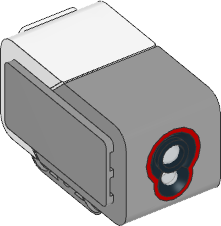
- class ColorSensor(port)
LEGO® MINDSTORMS® EV3 Color Sensor.
- Parameters:
port (Port) – Port to which the sensor is connected.
- await color() Color
Scans the color of a surface.
You choose which colors are detected using the
detectable_colors()method. By default, it detectsColor.RED,Color.YELLOW,Color.GREEN,Color.BLUE,Color.WHITE, orColor.NONE.- Returns:
Detected color.
- await ambient() int: %
Measures the ambient light intensity.
- Returns:
Ambient light intensity, ranging from 0% (dark) to 100% (bright).
- await reflection() int: %
Measures how much a surface reflects the light emitted by the sensor.
- Returns:
Measured reflection, ranging from 0% (no reflection) to 100% (high reflection).
- await rgb() tuple[int, int, int]
Measures the reflection of a surface using a red, green, and then a blue light.
- Returns:
Tuple of reflections for red, green, and blue light, each ranging from 0.0% (no reflection) to 100.0% (high reflection).
Advanced color sensing
- await hsv() Color
Scans the color of a surface.
This method is similar to
color(), but it gives the full range of hue, saturation and brightness values, instead of rounding it to the nearest detectable color.- Returns:
Measured color. The color is described by a hue (0–359), a saturation (0–100), and a brightness value (0–100).
- detectable_colors(colors)
- detectable_colors() Collection[Color]
Configures which colors the
color()method should detect.Specify only colors that you wish to detect in your application. This way, the full-color measurements are rounded to the nearest desired color, and other colors are ignored. This improves reliability.
If you give no arguments, the currently chosen colors will be returned.
When coding with blocks, this is configured in the sensor setup block.