| ✅ | ✅ | ✅ | ✅ | ✅ | ✅ | ❌ |
|---|
Power Functions
The ColorDistanceSensor can
send infrared signals to control Power Functions infrared receivers. You can
use this technique to control medium, large, extra large, and train
motors. The infrared range is limited to about 30 cm, depending on the angle
and ambient conditions.
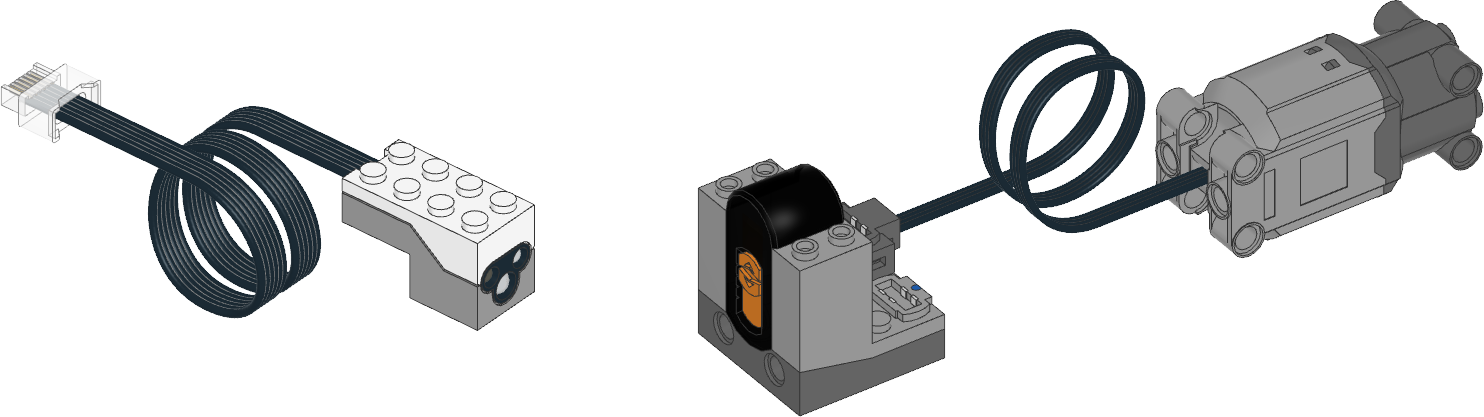
Figure 3 Powered Up
ColorDistanceSensor
(left), Power Functions infrared receiver (middle), and a Power Functions
motor (right). Here, the receiver uses channel
1 with a motor on the red port.
- class PFMotor(sensor, channel, color, positive_direction=Direction.CLOCKWISE)
Control Power Functions motors with the infrared functionality of the
ColorDistanceSensor.- Parameters:
sensor (ColorDistanceSensor) – Sensor object.
channel (int) – Channel number of the receiver:
1,2,3, or4.color (Color) – Color marker on the receiver:
Color.BLUEorColor.REDpositive_direction (Direction) – Which direction the motor should turn when you give a positive duty cycle value.
- await dc(duty)
Rotates the motor at a given duty cycle (also known as “power”).
- Parameters:
duty (Number, %) – The duty cycle (-100.0 to 100).
Examples
Control a Power Functions motor
from pybricks.parameters import Color, Port
from pybricks.pupdevices import ColorDistanceSensor, PFMotor
from pybricks.tools import wait

# Initialize the sensor.
sensor = ColorDistanceSensor(Port.B)

# Initialize a motor on channel 1, on the red output.
motor = PFMotor(sensor, 1, Color.RED)

# Rotate and then stop.
motor.dc(100)
wait(1000)
motor.stop()
wait(1000)

# Rotate the other way at half speed, and then stop.
motor.dc(-50)
wait(1000)
motor.stop()
Controlling multiple Power Functions motors
from pybricks.parameters import Color, Direction, Port
from pybricks.pupdevices import ColorDistanceSensor, PFMotor
from pybricks.tools import wait

# Initialize the sensor.
sensor = ColorDistanceSensor(Port.B)

# You can use multiple motors on different channels.
arm = PFMotor(sensor, 1, Color.BLUE)
wheel = PFMotor(sensor, 4, Color.RED, Direction.COUNTERCLOCKWISE)

# Accelerate both motors. Only these values are available.
# Other values will be rounded down to the nearest match.
for duty in [15, 30, 45, 60, 75, 90, 100]:
    arm.dc(duty)
    wheel.dc(duty)
    wait(1000)

# To make the signal more reliable, there is a short
# pause between commands. So, they change speed and
# stop at a slightly different time.

# Brake both motors.
arm.brake()
wheel.brake()